League Filters
Last updated
By default, strategies scan matches from all available leagues worldwide. Depending on your approach, you may prefer to focus only on specific competitions that better fit your analysis style.
League Filters let you do exactly that. Each filter is a named, reusable selection of leagues — build it once, then apply it to any of your strategies and to the In-Play Scanner.
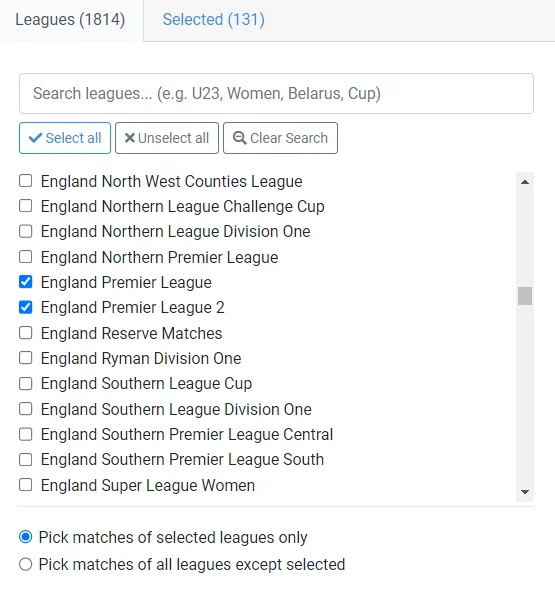
How league filters work
- Named and reusable. Create as many filters as you like (e.g. “Top European Leagues”) and attach the same filter to any number of strategies.
- One selection per filter. A filter is simply the list of leagues to include. Matches from any league not in the selection are ignored.
- Optional everywhere. A strategy without a filter — shown as All Leagues — scans every competition, including new ones as they are added.
Applying a filter to a strategy
Every strategy card has a Leagues section. Open its selector to:
- Choose All Leagues (no filtering), or
- Pick one of your saved filters — the active one is always visible on the card, or
- Create a New Filter on the spot.
Filtering the In-Play Scanner
The scanner uses the same filters. Open the filter on the League column and pick which of your filters to apply — the grid updates instantly, and your choice is remembered as your scanner default.
Creating and editing a filter
In the filter editor you give the filter a name and pick its leagues:
- Search by league name, country, code (e.g. “ES”), or alias (e.g. “England”, “Türkiye”) — case and accent-insensitive.
- Country groups with master checkboxes let you select or clear a whole country at once.
- The Selected tab shows only your current selection, for a quick review of what the filter includes.
- Import Selection copies the leagues from one of your other filters, so you can start from something close and adjust — the right move when you want a different selection for one strategy without touching a filter that others share.
Your filters live on the Manage Filters page, where each one shows a “Used by” badge listing the strategies attached to it — worth a glance before editing a shared filter. The same controls (rename, edit leagues, delete) are also available from any selector — the arrow next to each filter reveals them.
Deleting a filter is safe: anything using it simply reverts to All Leagues. And a filter always keeps at least one league — if you don’t want any filtering, choose All Leagues instead of emptying the selection.
Used to the old “exclude” mode?
Earlier versions offered two filter modes: include or exclude a list of leagues. Filters are now selection-based only — a filter is exactly the list of competitions it allows, with no mode switch to think about.
Existing “exclude” filters were converted automatically to the equivalent selection — every competition except the ones you were excluding. They allow exactly the same matches as before, and no action is needed on your side.
To build an exclude-style filter today: press Select all in the editor, then search for the competitions you don’t want and deselect them. Same result, a few seconds of work.
New leagues over time
New competitions are added to InPlayGuru regularly. Because a filter includes only the leagues you selected, newly added leagues are not part of your existing filters automatically.